

123 Flash Chat Server Software
Home > Admin Panel > Module Settings > Audio Video Module
User Manual
Home > Admin Panel > Module Settings
  • Introduction
  • Installation and Upgrade
  • Admin Panel
  • License Info
  • Code Generator
  • Code Generation
  • Basic Settings
  • View Settings
  • Skin Setting
  • Message Settings
  • Sound Settings
  • Cache Settings
  • Custom Menu Items
  • Advertising Settings
  • Predefined Message
  • Flash Emotion
  • Sound Message
  • Font Size Settings
  • Greeting Settings
  • Registration Settings
  • Room Settings
  • About Add Button
  • About Delete Button
  • About Modify Rooms
  • System Settings
  • Basic System Settings
  • Language settings
  • Filter Words
  • Integration Panel
  • User Management
  • Add User
  • Edit User
  • Admin Account
  • Ban Settings
  • Module Settings
  • Friendlist Module
  • Encrypt-Message Module
  • Event-Chat Module
  • Invisible-Admin Module
  • Moderated-Chat Module
  • Change-Nickname Module
  • Avatar-Chat Module
  • Audio/Video Module
  • White-Board Module
  • File Transfer
  • Image-Transfer Module
  • FMS-Server-URL
  • Handwriting
  • Invitation Bot
  • System Management
  • Monitor Panel
  • Announcement Panel
  • Restart
  • Import Data
  • Affiliate
  • Submit Ticket
  • Website Integration
  • DIY Skins and Smiley
  • For Developers

Home HomePre page Avatar-Chat Module | White-Board Module Next page

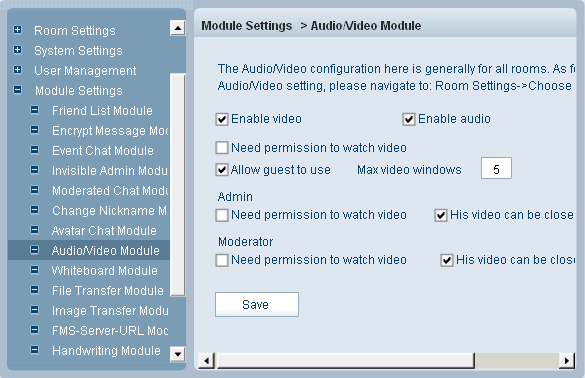
Audio/Video Module


With audio/video module enabled, you can add webcam and voice chat feature in your chat room.


Enable video:
Only with this item checked can user use video.

Enable audio:
Only with this item checked can user use audio.

Need permission to watch video:
With this item unchecked, a user can view another user's video without permission.

Allow guest to use:
With this item checked, guest can use video feature.

Max video windows
This item defines the maximum video window number in a chat room.

Administrator needs permission to watch video
With this item unchecked, admin can view a user's video without his permission.

Admin: his video can be closed
With this item checked, a user can close an administrator's video.

Moderator needs permission to watch video
With this item unchecked, moderator can view a user's video without his permission.

Moderator: his video can be closed
With this item checked, a user can close a moderator's video.


Related links:

Friendlist Module

Event-Chat Module

Moderated-Chat Module

Avatar-Chat Module

File Transfer

FMS-Server-URL

Invitation Bot


Home HomePre page Avatar-Chat Module | White-Board Module Next page

Home | About | Demo | Features | Download | Order | FAQ | Support | Reviews | Affiliate | Links | Sitemap | Community | Blog
 
Chat Server Software| Flash Video Chat| Online Webcam Chat| Webcam Chat Room Software| Customizable Chat Program | Instant Messaging Chat Server
Flash Chat in China | Chat Plugin| Free Chat Host| Free Chat Server Download| Live Support Software | Add Chat Room to Website
Legal Disclaimer| Privacy Statement | Terms of Use Copyright © 2001-2009 TopCMM Software Corp. All Rights Reserved.