

123 Flash Chat Server Software
Home > Admin Panel > User Management > Edit User
User Manual
Home > Admin Panel > User Management
  • Introduction
  • Installation and Upgrade
  • Admin Panel
  • License Info
  • Code Generator
  • Code Generation
  • Basic Settings
  • View Settings
  • Skin Setting
  • Message Settings
  • Sound Settings
  • Cache Settings
  • Custom Menu Items
  • Advertising Settings
  • Predefined Message
  • Flash Emotion
  • Sound Message
  • Font Size Settings
  • Greeting Settings
  • Registration Settings
  • Room Settings
  • About Add Button
  • About Delete Button
  • About Modify Rooms
  • System Settings
  • Basic System Settings
  • Language settings
  • Filter Words
  • Integration Panel
  • User Management
  • Add User
  • Edit User
  • Admin Account
  • Ban Settings
  • Module Settings
  • Friendlist Module
  • Encrypt-Message Module
  • Event-Chat Module
  • Invisible-Admin Module
  • Moderated-Chat Module
  • Change-Nickname Module
  • Avatar-Chat Module
  • Audio/Video Module
  • White-Board Module
  • File Transfer
  • Image-Transfer Module
  • FMS-Server-URL
  • Handwriting
  • Invitation Bot
  • System Management
  • Monitor Panel
  • Announcement Panel
  • Restart
  • Import Data
  • Affiliate
  • Submit Ticket
  • Website Integration
  • DIY Skins and Smiley
  • For Developers

Home HomePre page Add User | Admin Account Next page

Edit User


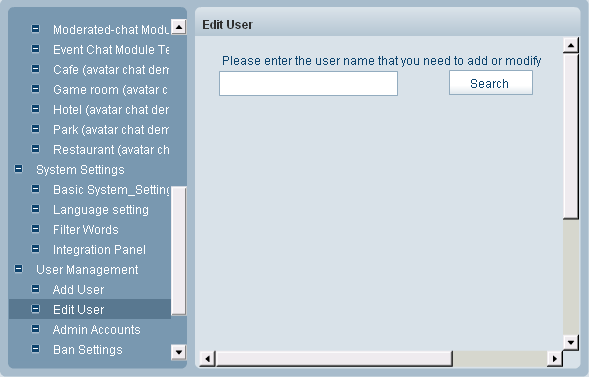
When you log inĀ  Edit User , you will see Search User panel, don't be confused, in fact this is the most efficient way to locate a user when your have tens of thousands of records in database.

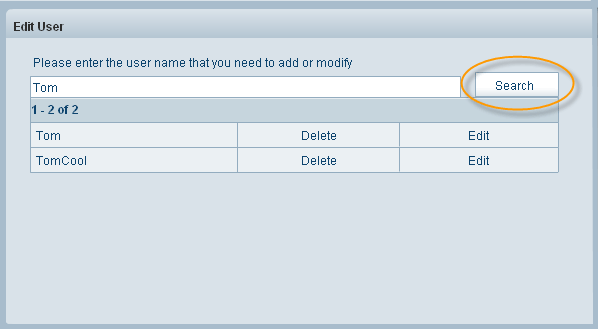
Let's explain the feature in this way, if we need to modify the information of a user named Tom, we can do it in this way: we fill in the textbox with "Tom", and click Search.


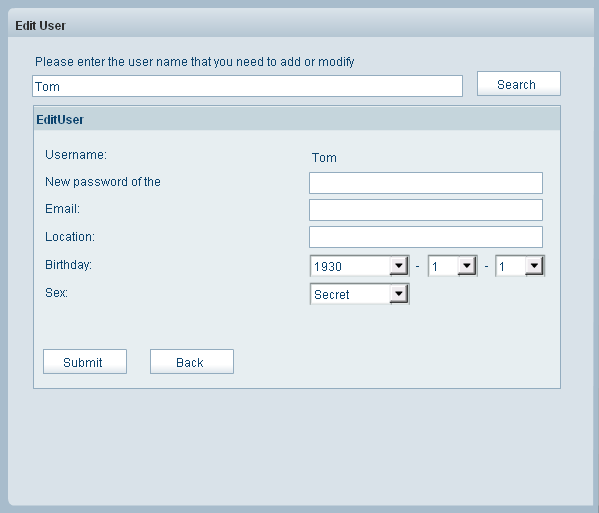
If we need to modify Tom's user information, we can click his name directly, or click Edit button.


At here, you can modify his user information like password, Email, Location, etc. when you finish your modification, click Submit.

If you need to delete the user, you may click Delete in Edit User panel.

Related links:

Add User

Admin Account

Ban Settings


Home HomePre page Add User | Admin Account Next page

Home | About | Demo | Features | Download | Order | FAQ | Support | Reviews | Affiliate | Links | Sitemap | Community | Blog
 
Chat Server Software| Flash Video Chat| Online Webcam Chat| Webcam Chat Room Software| Customizable Chat Program | Instant Messaging Chat Server
Flash Chat in China | Chat Plugin| Free Chat Host| Free Chat Server Download| Live Support Software | Add Chat Room to Website
Legal Disclaimer| Privacy Statement | Terms of Use Copyright © 2001-2009 TopCMM Software Corp. All Rights Reserved.